Introduction to WireframeSketcher

WireframeSketcher is based on Eclipse platform. I use it a lot to create mockups for websites and applications. It helps to focus on content, usability and features, instead of design. When your mockup is tested with future end users and documented for developers, it’s time think about design.

Overview

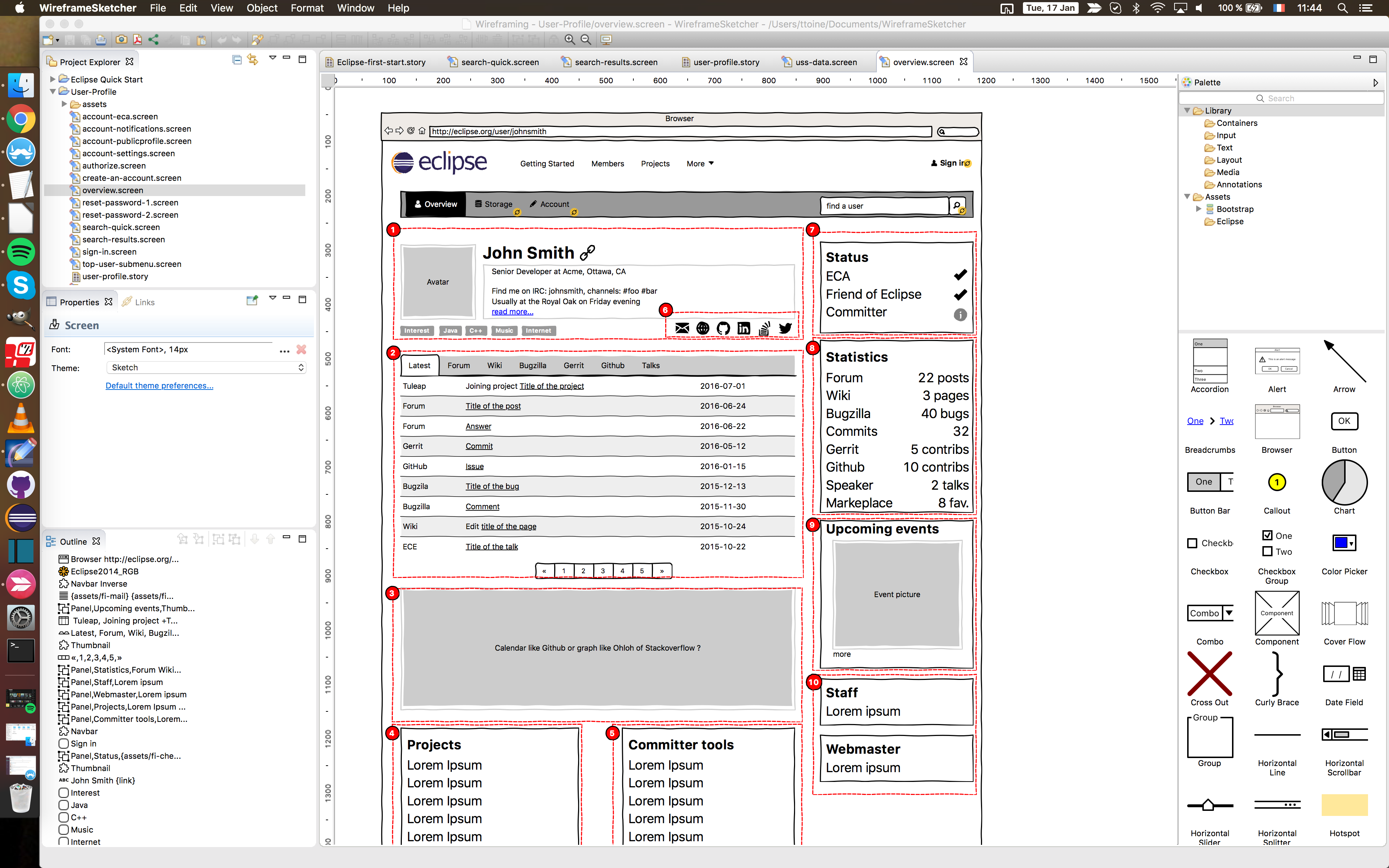
Eclipse users will not be disappointed, the workbench is quite the same, but in the middle, you draw instead of writing code. Also, instead of just drawing basic shape, there is a style added so everything looks like it has been done on paper with a pen. This way, in the mind of people looking at the mockup, you are sure they think about it as a mockup, and not as a definitive design.

You can also add annotations for documentation purpose.

And you can create links on items to other screens, in order to create a live mockup. You can play the live mockup in Wireframesketcher, and also export in HTML to share it.
First project

Menu: File / New / Wireframe project

You can select different type of project, from web to smartphone app, …

Assets

You might want to build a mockup using elements you already have: logo, screenshots or pictures, icons, … You can add them to the “assets” folder of WireframeSketcher folder. They will be available on the right column. When possible add SVG files, so that the software can apply the “hand style”.

WireframeSketcher provides Stencils, it is libraries of screens, icons, mockups, ready to use. You can find them on their website:
http://wireframesketcher.com/mockups/index.html

Icons

You can add an icon alone or with a label, by adding the “Icon” element from the palette.

It is also possible to add icons in some content (text) or attached to an item (button, input, …). To attach an icon to an item, you can click on the properties on the left sidebar, and you can browse the different icon librairies available. With text, you can start to type the name of an icon in { } and use ctrl+space to display some help.

Links

Draw at least 2 screens. You can add links to another screen on elements like buttons, but also on text. Text must be between [ ] to be considered as link. You can’t add links to external resource.

In a screen, select the element. On the left sidebar, next to “Properties”, select “Links”. You will find a list of possible links, just click on the one you want and select the screen to open. That’s all. You will notice the link on the mockup with a special small yellow icon on the item.

The most difficult part of it is to think about the structure, all the links between all the pages. On a live demo, you can highlight links, so testers can easily find the clickable areas.

Annotations

On the right column you will find annotations elements. You can of course change the colour. If you need to use an other element (a square, a round, …), and make it an annotation, you can do that in the menu: Object / Mark as annotation.

During export, you can choose if you want to see them, or hide them.

Storyboard

A storyboard is what will allow you to run the mockup. Put in it all the screens. Be careful about the order of the screens, so the user starts the mockups at the good place. Once done, you can run or export your live mockup.

During a live demo, users will be able to click on the links, or to use left and right keyboard arrows.

Missing features

IMHO, there are two issues with the current version of Wireframesketcher:

  1. You can’t hide annotation while working on the screen, so if you have stuff below, you can not select them. It’s really bad for productivity. There should be at least a layer management system, so one can put all the annotations in one layer and hide them. This is really a missing feature. I already discussed about it on the user forum, the solution they propose is not really useful. And there is no workaround.
  2. There are a lot of text styling options, but no equivalent of the “pre” html tag. It means there is no way to add monotype text.  Let say you want to show how command line or code should look in a design, with fixed characters size, this is not possible. If you are interested too, do not hesitate to tell the developers on the forum.

Conclusion

Despite a few missing features, I really appreciate WireframeSketcher to work on features and UX. I use it at the moment mainly for web stuff. However, I really think that would be awesome to have Eclipse Platform stencils. This way, Eclipse developers could use that to work on their UI/UX before starting to code, collect end user feedback. And also, very important thing, this would be great to share best practice and have a more consistant UI across different Eclipse plugins, applications, tools, …

Projects are now listed on user profile

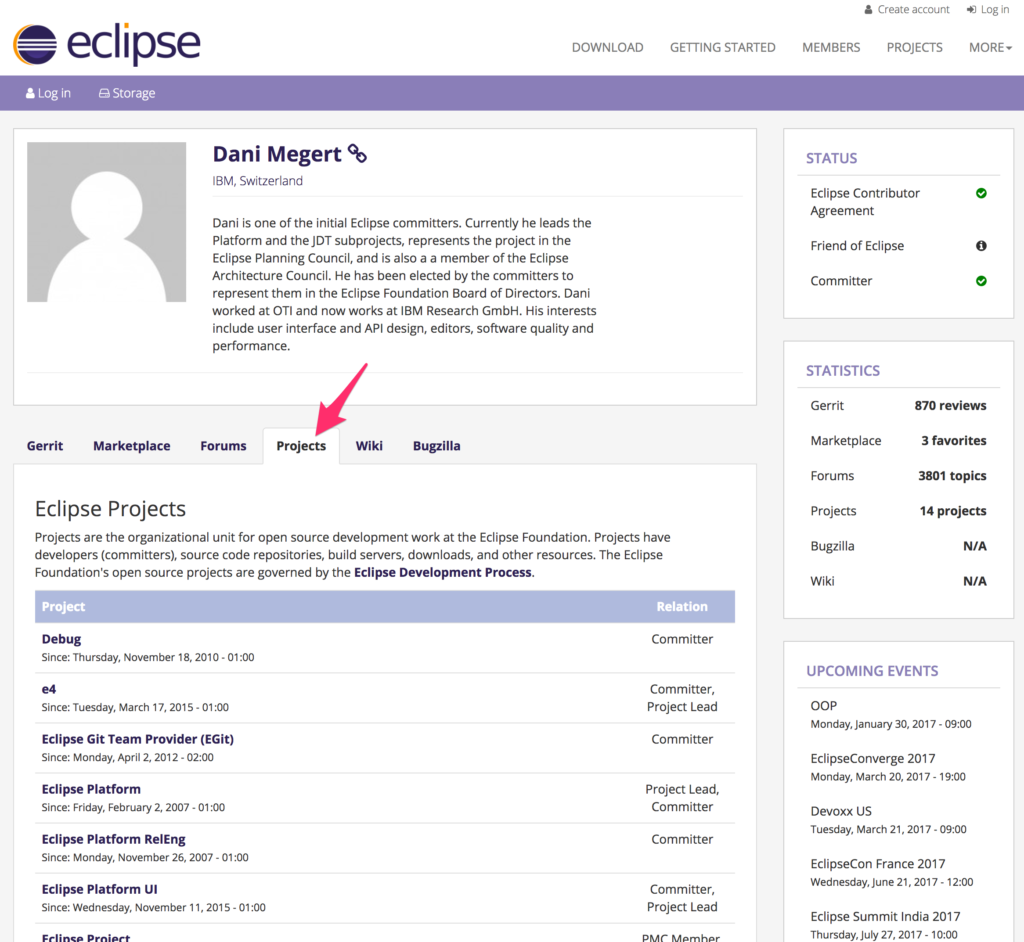
As an example, I will share a screenshot of Dani Megert’s profile: he was the recipient of the lifetime achievement award at Eclipse Con Europe 2016. He is one of the top contributors to Eclipse.

When you browse a user profile, you can see the list of projects. And roles are listed on the right column. You will also notice that in the statistic block, there is a new counter for Projects. As usual, feedback is welcome.

I wish you a Merry Christmas and a Happy New Year ? ?

Gratuité, produits, services et Tristan Nitot

J’entend souvent cette petite phrase à propos des grands services gratuits sur le Web, comme Google ou Facebook:

Si c’est gratuit, c’est toi le produit

Cela m’embêtait cependant grandement au regard de la gratuité  pour l’utilisateur final de nombreux logiciels libres. Et du coup, j’ai demandé sur Twitter son avis à un expert du sujet, M. Tristan Nitot. Voici ce qu’il en dit, et je l’en remercie.

https://twitter.com/nitot/status/806470816569393153

Fond d’écran – Décembre 2016

De temps en temps, je change l’image de fond de mon site web. Cette fois ci, je suis allé sur Unsplash, dont les images sont libres de droits. C’est ni plus ni moins que la photographie d’un casque audio de référence pour le studio, que j’ai à la maison, que vous verrez sur la tête de pleins d’animateurs radio. Et j’adore ce casque.buzpfckq6lw-alex-holyoake

Cliquez ici ou sur l’image pour aller la récupérer sur Unsplash en grande résolution. 

The Eclipse User Profile

Following a soft release in October 2016, including several features, the collection of user feedback, related testing and adding improvements, it is officially time to announce the launch of…

“The Eclipse User Profile“

Story

The aim of the Eclipse User Profile (previously known as the User Dashboard), is to provide user’s with an overview of their community user activity on eclipse.org websites and services (such as Eclipse Marketplace).

The User Profile includes:

  • A simple URL, easy to remember and share, https://eclipse.org/user/ttoine;
    An overview of a user’s activity, retrievable from their account, and also made shareable with a link;
    A way for community users to find other users, and to understand who they are;

Use Case:

  • A young developer is using a plugin in the Eclipse IDE, and submits a bug to ask for an improvement. A top contributor or project lead answers the bug. On Bugzilla, the only information you can see about a specific user is their email address. So how can the young engineer contextualize the value and merit of the answer he or she receives?
  • Instead of only being able to see a public email address, a link to the Eclipse User Profile will appear, helping the young developer understand who the other participants are, and why their input is of value.
  • Users can also share their profile URL in their email signature, on social networks, when applying for a job, as a footprint of their activity and software development work…

Roadmap

Every month we will add new features to the Eclipse User Profile. Below you will find a list of the currently available features, and the features scheduled on the roadmap for the next release.

Released :

  • User presentation, including short presentation, social networks and interests;
  • Eclipse status;
  • Upcoming events;
  • Developer tools, Committer tools;
  • Data management;
  • Applications management;

In Progress:

  • Hudson HIPP control;
  • Activity tab has Gerrit, Marketplace and Forum (more to come);
  • Statistics block has Gerrit, Marketplace and Forum (more to come);

December Release:

  • Adding pagination to the activity tab to improve user experience;
  • Adding an activity tab about Projects involvements;
  • Starting migration of the user preferences and information to the user profile;

If you want to submit a bug on Bugzilla, please open it under ‘Community’, and select the ‘accounts.eclipse.org’ component. You can set it to block bug 493458.

Coming Soon

Other features are planned on the roadmap, such as the  integration with Eclipse Bugzilla and Wiki, listing talks at events and articles on Eclipse Planet. Anything we deem potentially useful for Eclipse users that are active within the Eclipse ecosystem, but who are not necessarily code contributors.

We are also interested in displaying Github activity, as it affects Eclipse end users. Although it is outside of our infrastructure, it would be very interesting to display Github activity and user information. If you know Github’s API well, your help is welcome in order to assist us in planning the best way to display information like the number of commits a user has per year in the statistic block, and user’s recent activity (e.g: like for the forum, last activity in contributing repositories).

F.A.Q

Can I add my project to the Eclipse User Profile?

The User Profile is open to integration with Eclipse projects.

This can be done to:

  • Display information on the activity tab;
  • Store application data on the user profile;
  • Manage access rights with OpenID connect;
  • If you are interested, please, do not hesitate to contact us with your feedback and input.

How do we retrieve user data?

To fetch data from our API and to display it on the user profile, we are using a jQuery library. For some of the services we use their REST API. And for other services, we gather data before on api.eclipse.org. This architecture is very flexible, and allows the User Profile to in theory retrieve data from all of the eclipse.org sites. You can find our work on Github: https://github.com/EclipseFdn/jquery-eclipsefdn-api

Is the data public?

We only display information that is already publicly available on your user profile, coming from the Eclipse’s websites. We may display public information from Github in near future if we proceed with the integration.

How do I find a user?

This is a very good question, and we are working on this capability. The specification should be done before the end of December 2016, in order to start the development of this functionality at the beginning of next year. The general idea is to have a simple search for first-name/name, nickname, or email, with some filtering options. An advanced search form could be made possible, with more fields retrieved from public data, like location, organisation, social networks accounts, projects involvement.

Feedback is welcome

The feedback we have received from early adopters has been positive and instrumental in allowing us to improve the Eclipse User Profile. It is clear that Eclipse end users and contributors don’t have the same needs. That is why your feedback is important and needed to help us distinguish functionality.

If you have ideas, if you want to help, or if you want to share your experience, please:

Thank you!

Video – Eclipse Marketplace & Favourites List

Following my recent series of articles about the Eclipse Marketplace Client, I have recorded a short video tutorial to show you how to use favourites lists on Eclipse.org and in Eclipse:

  • Add / remove plugins in your favourites list on marketplace.eclipse.org
  • Add / remove plugins in your favourites list with the Eclipse Marketplace Client
  • Import the favourites list from an Eclipse Community user in the Marketplace Client
  • Share your favourites 🙂

Here are a few favourites lists that I would like to share with you. You can import them directly by copying and pasting the link in Eclipse Marketplace Client:

So? What are your favourite plugins and packages on Eclipse Marketplace? Build your list, and share it with your team. We encourage you to share your lists with us on Twitter using #EclipseMarketplace.

Watch the video on Youtube: