Lysistrata

Ça faisait longtemps que je n’avais pas partagé de vidéo musicale sur mon blog, et voilà que j’ai découvers récemment Lysistrata, un groupe de rock avec une orientation math-rock.

En particulier, cette vidéo me rappelle l’esthétique soignée des clips que faisaient Battles, par le passé. Avec certe un son un peu plus énervé, et probablement réalisé avec moins de moyens. Il n’empêche, le résultat est là, c’est superbe.

A noter, ils sont vraiment très bons en concert, allez les voir s’ils passent près de chez vous !

Nicolas Lespinasse, video de la musique “Racines du ciel”

Il ya deux ans, Nicolas Lespinasse était venu enregistrer son album “Voyages Intérieurs”.

Après une nouvelle prise de son dans le studio d’Une Jolie Musique, il a travaillé avec le vidéaste Cyril Romano afin de réaliser un clip vidéo. Une très belle réalisation, issue d’une collaboration locale sur le plateau du Vercors, dont on retrouve les décors pour cette musique méditative, à regarder sur Youtube:


It’s time to organise Eclipse Oxygen DemoCamps

The next major release of the Eclipse Oxygen is coming up on June 28 and, it means the start of this year’s Eclipse DemoCamps season. If you or your colleagues are considering a DemoCamp for 2017, we would like to help!

What’s a DemoCamp?

You may be asking yourself what the heck a DemoCamp is and why should you care? Eclipse DemoCamps are typically 1-day or even evening events organized by Eclipse community members all over the world. The organizers bring together a set of expert speakers and attendees from their local community. In other words, it’s a free event where you get to meet fellow Eclipsians and learn from each other in the form of demos/talks about Eclipse technology.

How do I get started?

This is the best part, wherever you are, you can organize an Eclipse DemoCamp! You choose the place, set the time, organize the venue (maybe a local pub or company office), provide a screen and projector, and arrange for refreshments.

To tell us that you are planning an Eclipse DemoCamp:

  • Send us an email on democamps@eclipse.org to ask about support, speaker ideas or possible goodies
  • Add it to the DemoCamp 2017 wiki page

To add it, simply create a page with the program and venue information. And if you use another service like Meetup, just add a link to it from the Eclipse wiki. We will be pleased to list it on events.eclipse.org.

How does Eclipse Foundation help?

We, as the Eclipse Foundation, will participate to the cost of food, beverages, and room rental up to $300. We encourage organizers to find outside corporate sponsors to help organize their event. Sponsors usually contribute a certain amount, food or provide the space. Please acknowledge your sponsors on the DemoCamp & Hackathon wiki page and at the event itself.

We will help you promote it through the Eclipse Foundation’s social media network and website. To read more about organizing an event, visit this page “Organise an Eclipse DemoCamp or Hackathon“.

Eclipse Foundation staff also tries to attend the DemoCamps. This is obviously not always possible, but who knows… we could be coming to yours!

In 2016, DemoCamps took place in 19 different cities, from 10 different countries: Austria, Canada, China, Germany, Guatemala, Hungary, India, Norway, Poland, and Switzerland! We need you to reach new places in 2017 and that place could be near you!

Looking forward to hear from you 🙂

JDLL 2017

Une Jolie Musique sera aux JDDL 2017 à Lyon ce week-end.

Nous n’y avons pas de stand, mais Antoine THOMAS, fondateur de l’association, animera une conférence et un atelier.

JDLL Lyon - 1-2 avril 2017

Venez discuter et échanger sur les possibilités offertes par les logiciels libres et open source pour produire des enregistrements audios, et des vidéos.

Grenoble Cybersecu meetup – enregistrement de la conférence

Voici la vidéo enregistrée par nos soins pour le Grenoble Cybersecu meetup:

Enregistrement audio et vidéo avec le logiciel libre OBS, et gestion du live avec une petite console de mixage usb. Le 3ème talk était via Skype, et l’avantage de cette solution est qu’elle permet de diffuser le son tout en l’enregistrant, ce qu’on ne peut pas faire facilement avec une carte son classique.

A venir, nous publierons un petit dossier sur les solutions logiciels/matériels open source, que l’on peut utiliser pour réaliser ce genre d’enregistrement. Et bien sûr, l’idée est de proposer quelque chose de cross platform Windows/Mac/Linux, pour bien choisir ce que vous achetez.

Tutorial – Eclipse Marketplace & Favourites List

A few months ago we introduced the Eclipse Marketplace Favourites List. To explain how it works I created a video tutorial. This article will be a more classic tutorial to explain what Eclipse Marketplace is and how you can use the Favourite Lists to your advantage.

What is Eclipse Marketplace?

The Eclipse Marketplace is a place to discover, share, and install relevant Eclipse plugins and solutions. Think of it like an app store for Eclipse solutions.

One of it’s main uses is to add plugins to your Eclipse installation. You will also find applications based on Eclipse Platform, tooling for IoT and other solutions and services. In this article you’ll find out how to do so – you might even learn a few new tricks along the way.

Favourite list online

One of the great features of the Eclipse Marketplace is the possibility to create and share a list of plugins. This is very helpful if you have many Eclipse installations, and want to find and install your favourites one quickly. How can you do this on the Eclipse website?

How to do this on the website?

  1. Go to https://marketplace.eclipse.org/ and sign up. Or create an account if you don’t have one yet.
  2. Search for your favourite solution
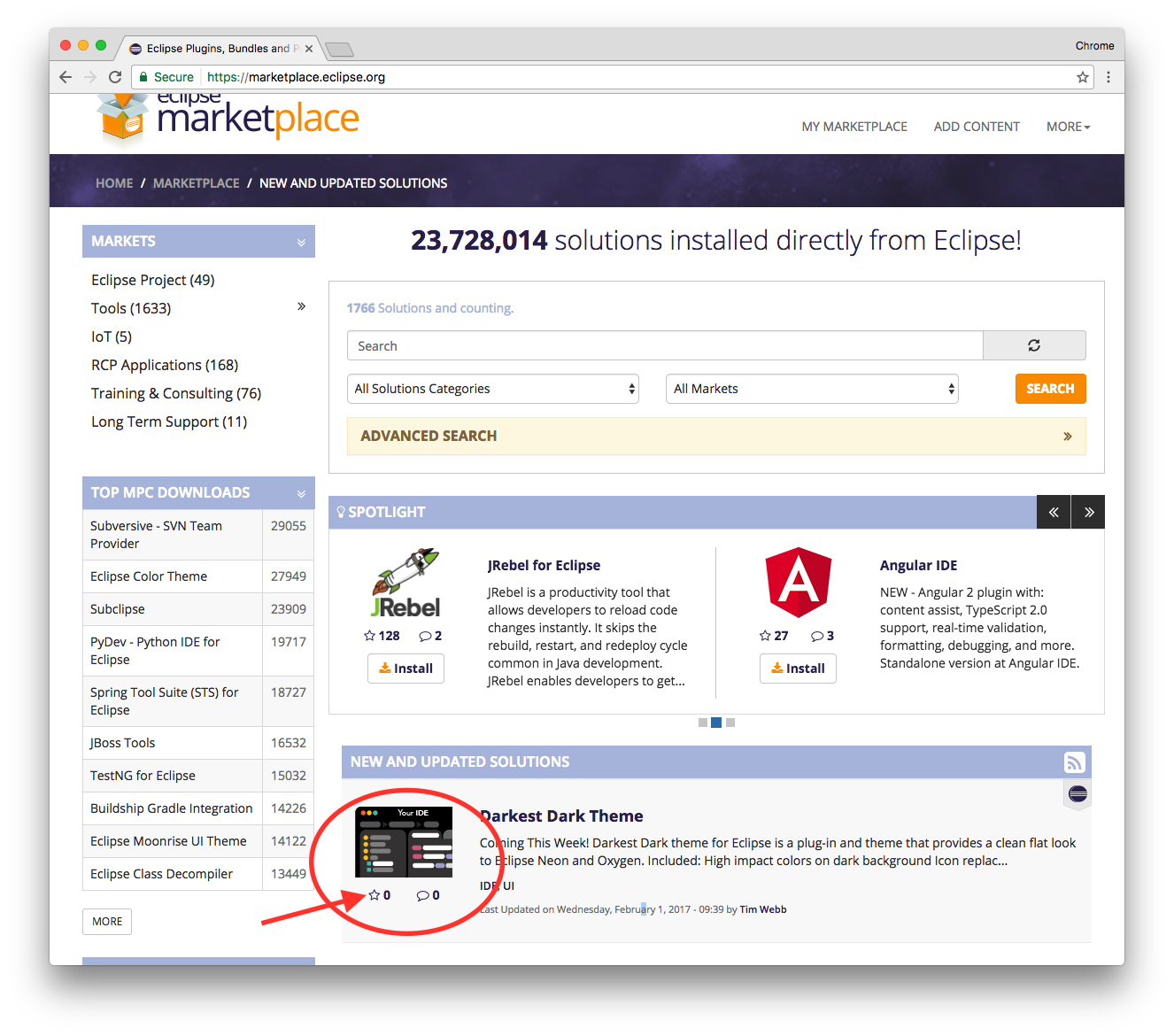
  3. Click on the white star below the logo to add a plugin to your Favourites list.

Visual Example

In this example, Darkest Dark Theme will be added to my favourites plugins list. Once a plugin has been “starred” it is automatically added to your list.
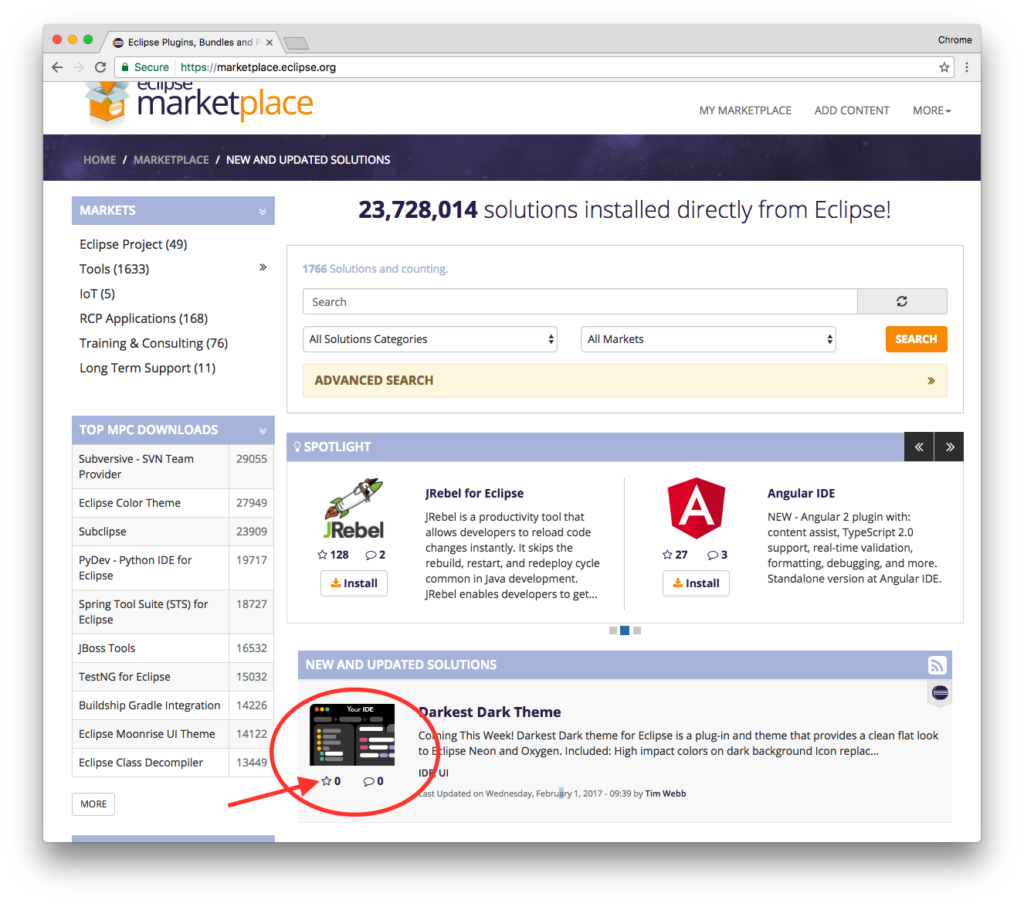
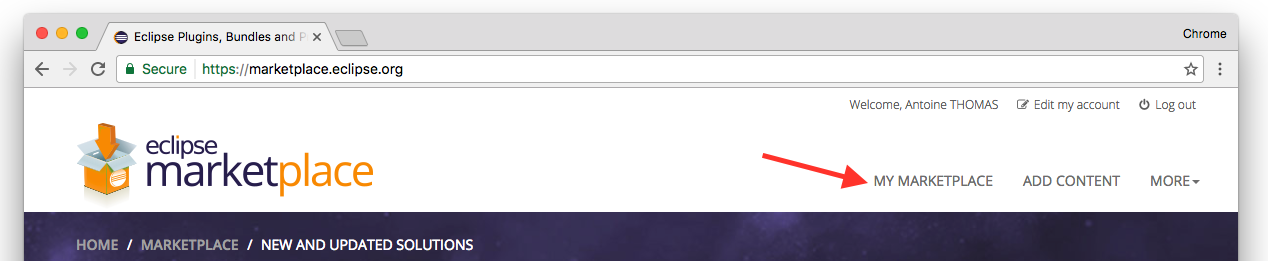
To view it, simply go to “My Marketplace”:
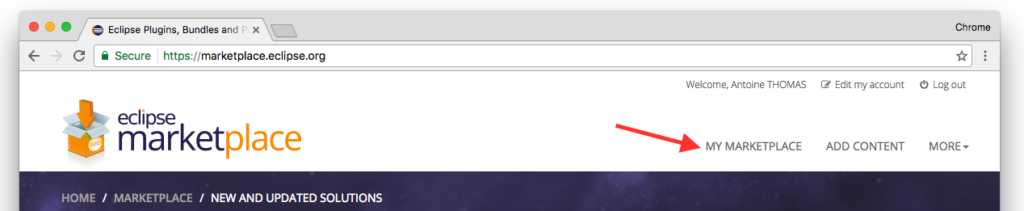
And there it is, in your list of favorites!

Marketplace Client in Eclipse

Manage plugins

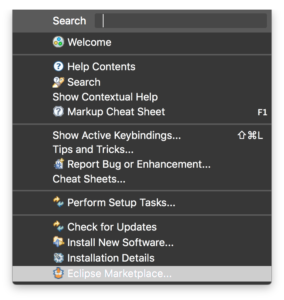
Did you know? You can install plugins from your Eclipse IDEs using the Marketplace Client. To launch it:

  1. Click on the “Help” tab in the menu.
  2. Click on “Eclipse Marketplace”.

You can also launch it using the Quick Access Bar at the top right of your Eclipse workspace.

  1. Click “Alt + 3” (Windows) or “Command + 3” (Mac) to launch the Quick Access search bar
  2. Type “Eclipse Marketplace”
  3. Hit “Enter” and voila – you’re there!

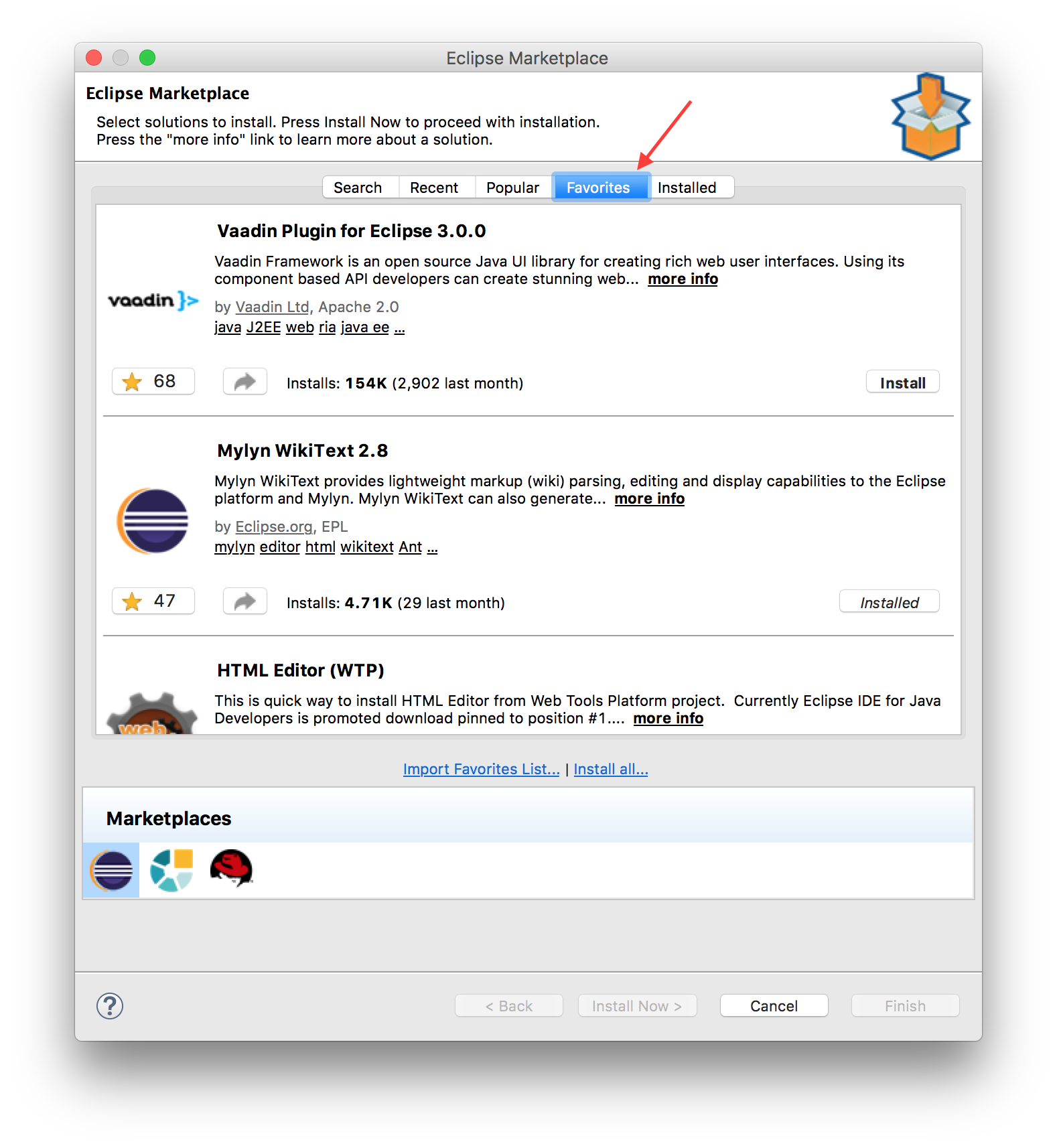
You can display and manage your favorites here too:
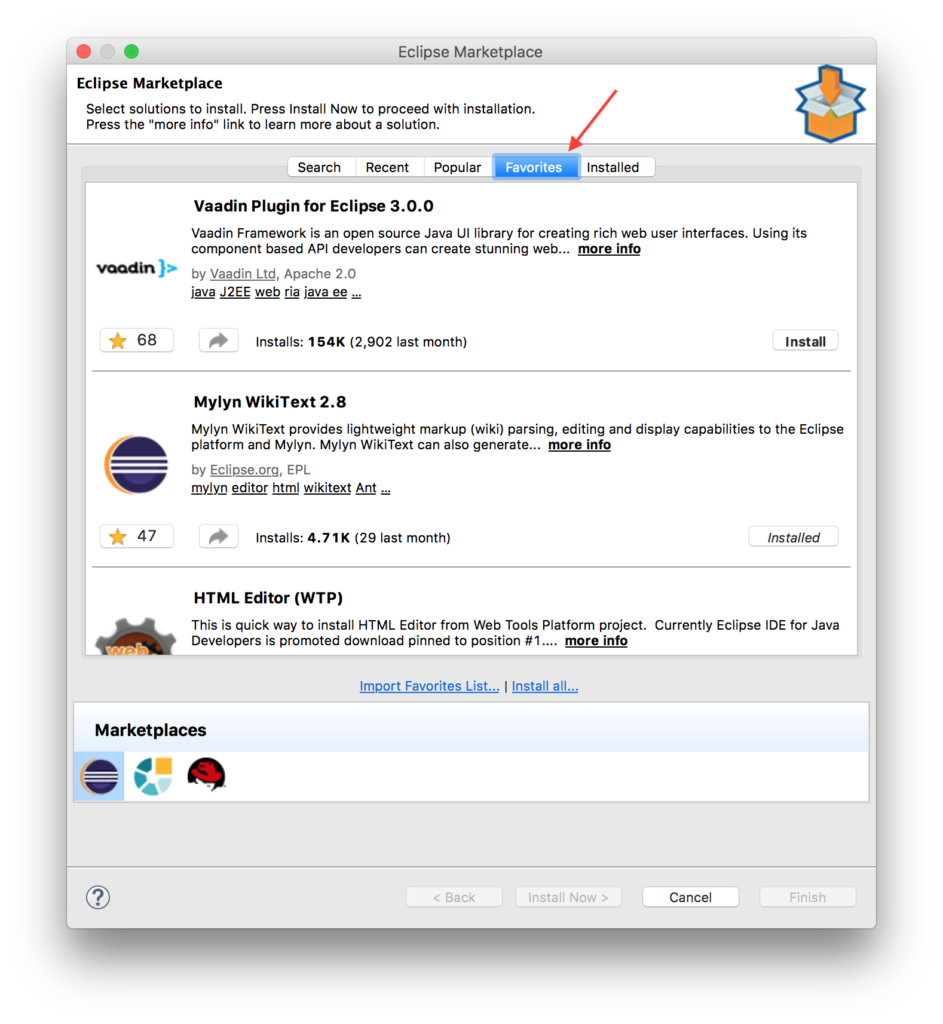
You can off course add, remove, and install plugins. The Eclipse Marketplace Client and the website store your favorites with your eclipse.org account, so they are synchronised.

Copying Another User’s Favourite List

If you want to install plugins in the list of someone else, say, a colleague, or another contributor to a project, this is also possible.  You can import a favourites list from an other Community users, and then select the plugin you want.

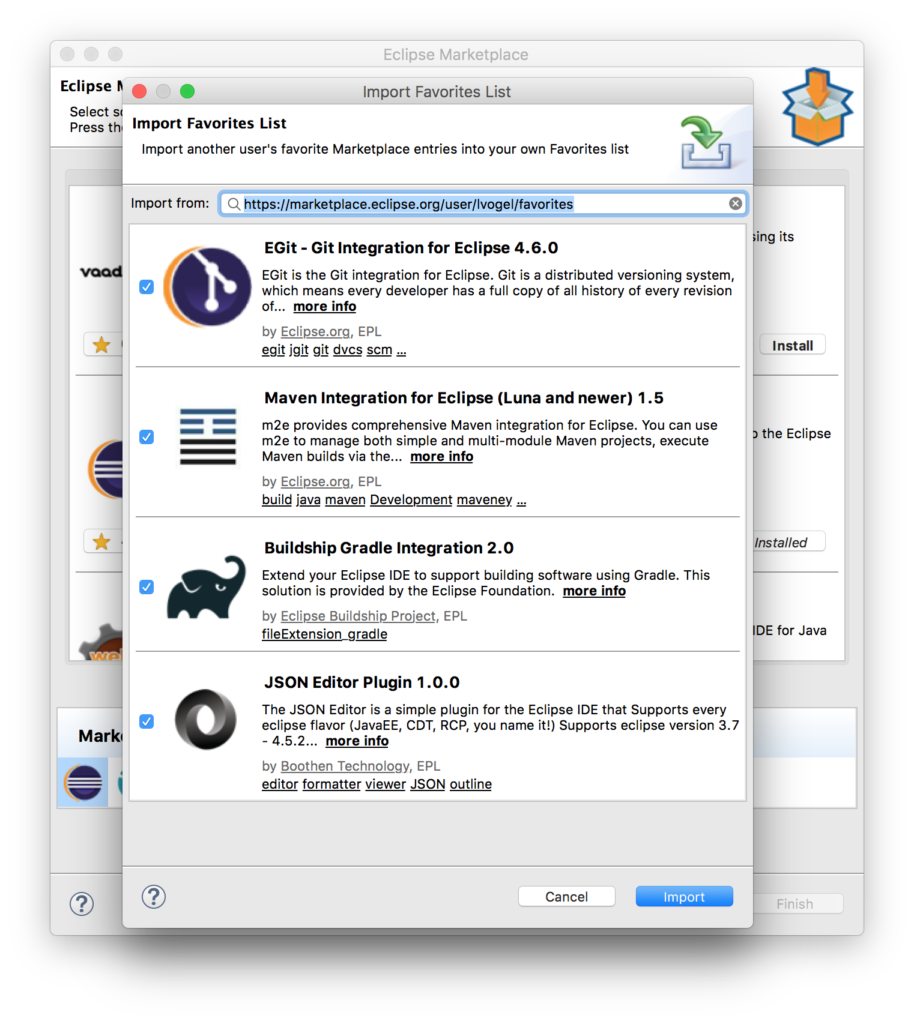
It’s also possible to install plugins from someone else’s list , say, a colleague, or another project contributor. To import a favourites list from an other Community users in your workspace Marketplace client:

  1. Click on “Import Favourites List”
  2. Copy/paste the link to someone’s favorites lists.
  3. All plugins are automatically selected. Unselect any plugins you don’t want by unchecking the checkboxes to the left of each individual plugin.
  4. Click import.

Here is an example with Lars Vogel‘s plugins.

Share

Long story short, to save time or to share your favourite plugins quickly and easily with someone else, you can add plugins to your favourites list. Sharing is simple, all you need is the link to your list. You can find this link on your user profile:
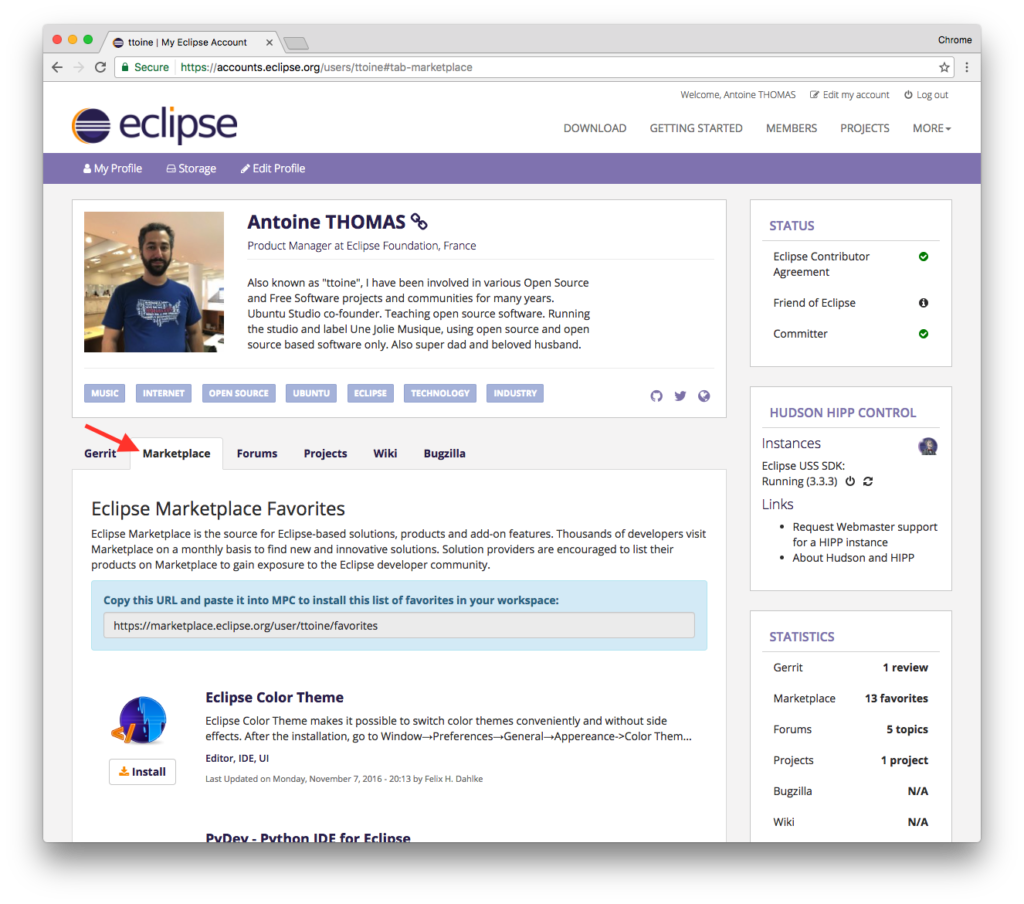
Here are a few Favourites Lists that I would like to share with you. You can import them directly by copying and pasting the link in Eclipse Marketplace Client:

Do not hesitate to share your favourite list on social networks. You can use #EclipseMarketplace on Twitter.

Feedback welcome

As usual, feedback is welcome and discussion is open. Do not hesitate to comment this article or to open an bug.